To counter the rise of sophisticated social engineering, tech support fraud, and AI deepfake coercion, Apple has officially introduced an anti-fraud system for iOS 27 designed to catch scam attempts in real time.
The framework, called Trust Insights, allows the iPhone operating system to detect when a user is actively being manipulated or “coached” through a scam—even if the user is the one legitimately authenticating and executing the actions.
1. How “Trust Insights” Works Under the Hood
Traditionally, anti-scam tools look for malicious links or known fraudulent phone numbers. Trust Insights operates differently by analyzing user behavior and interaction patterns directly on-device.
During a voice call, text conversation, or email exchange, the framework quietly monitors behavioral signals, including:
- Response timing: Sudden, forced delays or hyper-rapid typing prompted by a caller.
- Usage anomalies: Major deviations from the user’s normal routine or navigation habits.
- Basic sensor metrics: Interaction patterns that suggest a user is listening to instructions from an outside source while navigating sensitive menus.
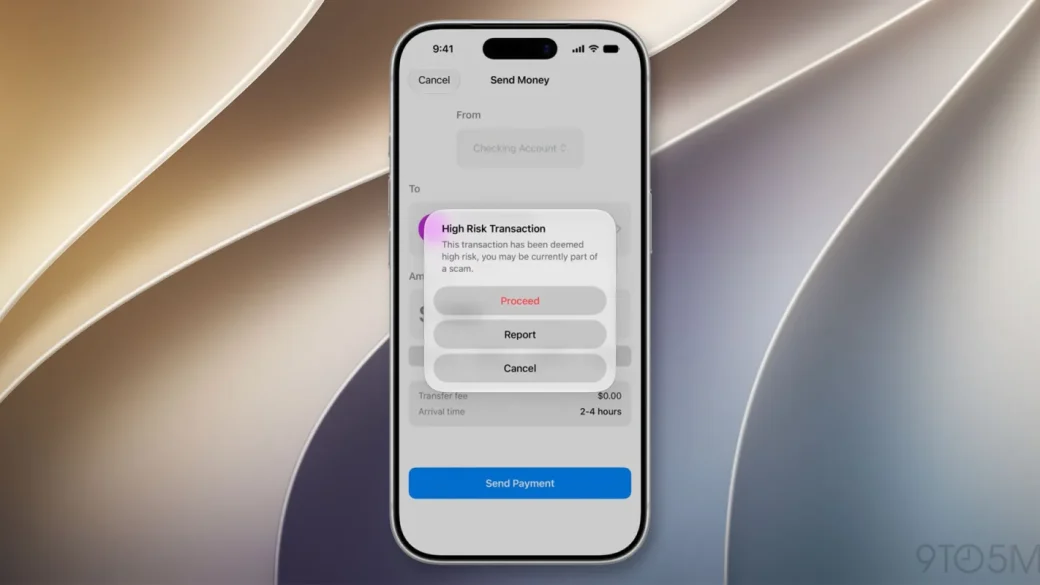
If these combined variables suggest a medium or high risk of fraud, the underlying app steps in dynamically. Depending on the threat level, the phone will implement a warning screen, add a forced procedural delay, or require an extra biometric verification step before allowing a transaction or data change to proceed.
 [ THE TRUST INSIGHTS SAFETY LOOP ]

 Active Call / Chat ──► On-Device Behavior Sweep ──► Anomaly Detected (e.g., Coercion Patterns)
                                                                │
   ┌────────────────────────────────────────────────────────────┘
   ▼
 [ THE REAL-TIME MITIGATION ]
   ├── Low Risk:    Standard System Banner Alert
   ├── Medium Risk: Forced 60-Second Transaction Delay
   └── High Risk:   Biometric Lock + Cooldown Warning Screen
2. Strict On-Device Privacy Architecture
Because monitoring real-time communications raises immediate privacy concerns, Apple engineered Trust Insights to follow strict zero-knowledge security protocols:
- No Content Inspection: The framework never reads or listens to the actual words spoken during a call or written in Messages, Mail, or third-party apps. It looks strictly at behavioral metadata and patterns.
- Instant Data Disposal: The underlying behavioral metrics used during the live analysis are discarded entirely from the device’s volatile memory the moment the interaction concludes.
- Server Evaluation: Once local processing finishes, only a single tokenized risk value is transmitted to Apple’s servers. This value is cross-checked against the user’s broader Apple Account footprint to flag global anomalies before making a final safety assessment.
- Coercion Cooldown: While users can toggle Trust Insights off in Settings, Apple has implemented a mandatory “cooldown period” to prevent scammers from simply ordering a panicked victim to disable the feature mid-call.
3. The Five Core Operational Categories
To prevent the framework from misidentifying normal heavy phone usage, Apple restricts Trust Insights to evaluate actions across five explicit developer categories:
| Operation Category | System Triggers | Protective Actions Taken |
.payment | Money transfers, bank wire attempts, and in-game asset purchases. | Introduces forced confirmation timers or outright blocks high-risk outgoing wires. |
.account | Changing Apple Account passwords, modifying 2FA details, or updating security questions. | Halts modification and triggers secondary device notification alerts. |
.communication | Sending text message blasts, submitting forms, or digitally signing sensitive legal documents. | Displays explicit warning banners outlining common impersonation tactics. |
.resourceUse | Sudden, high-volume requests to costly infrastructure (like intensive cloud AI inference). | Places a temporary throttle on the API tokens to prevent automated draining. |
.other | Fallback classification bucket for atypical, non-standard system behaviors. | Prompts developers to submit explicit feedback to refine edge-case classifications. |
By building this behavioral layer natively into iOS 27, Apple is attempting to address the weakest link in modern digital security: the human element. The feature acknowledges that while data encryption and biometric locks are excellent at stopping hackers, they are useless if a scammer can successfully convince an everyday user to open their own digital vault.