
WhatsApp is rolling out a major privacy update that changes how disappearing messages work. Spotted by WABetaInfo in the latest TestFlight and Google Play betas, WhatsApp is expanding its “View Once” philosophy to standard text conversations with a new feature called “After Reading.”
Currently, WhatsApp’s standard disappearing messages operate on a strict “brute force” timeline (24 hours, 7 days, or 90 days) from the exact moment they are sent—regardless of whether the recipient has actually opened them. This new update fixes that gap.
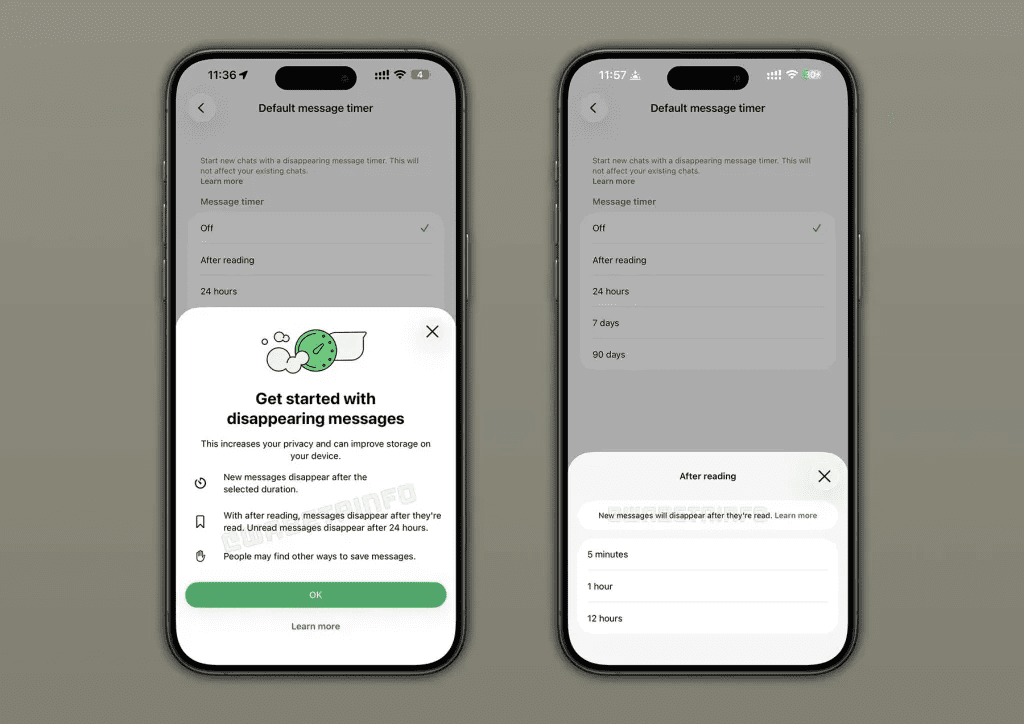
1. How the “After Reading” Timer Works
The new feature decouples the timer from the send time, shifting the countdown to the recipient’s viewing activity.
- The Trigger: The countdown only begins once the recipient actually opens and reads the text.
- The Countdown Options: Users can choose to have the message vanish 5 minutes, 1 hour, or 12 hours after it has been read.
- The Safety Net: If a message is sent but the recipient never opens it, it will automatically self-destruct after 24 hours by default so it doesn’t sit on servers indefinitely.
- Asynchronous Deletion: Interestingly, the sender’s side clears out based on the timer immediately after sending. For example, if you choose a 5-minute timer, the message leaves your screen 5 minutes after you send it, while the recipient’s 5-minute countdown won’t start until they open it hours later.
2. Upgrading Privacy Beyond Media
While WhatsApp has supported “View Once” for photos, videos, and voice notes since 2021, applying this logic seamlessly to text required a new framework.
| Feature Layer | Current Disappearing Messages | New “After Reading” Feature |
| Trigger Point | When the message is sent | When the message is opened/read |
| Scope | Global or per-chat default | Granular per-chat setting |
| Unread Lifespan | Controlled by the set timer (e.g., 24h) | Fixed 24-hour expiration |
| Granularity | Broad windows (Days/Hours) | Snappy windows (5m, 1h, 12h) |
3. Implementation and Availability
The setting appears inside individual chat controls under the “Default message timer” menu. It is an optional toggle that must be enabled manually for specific high-privacy interactions.
WhatsApp began early testing for this feature on Android in April and has just expanded it to iOS beta testers (version 26.19.10.72). Given its active status on both major operating systems, a public release to standard App Store and Google Play versions is expected in the coming weeks.
Get the day’s top stories in your inbox
One concise email. No spam, unsubscribe anytime.