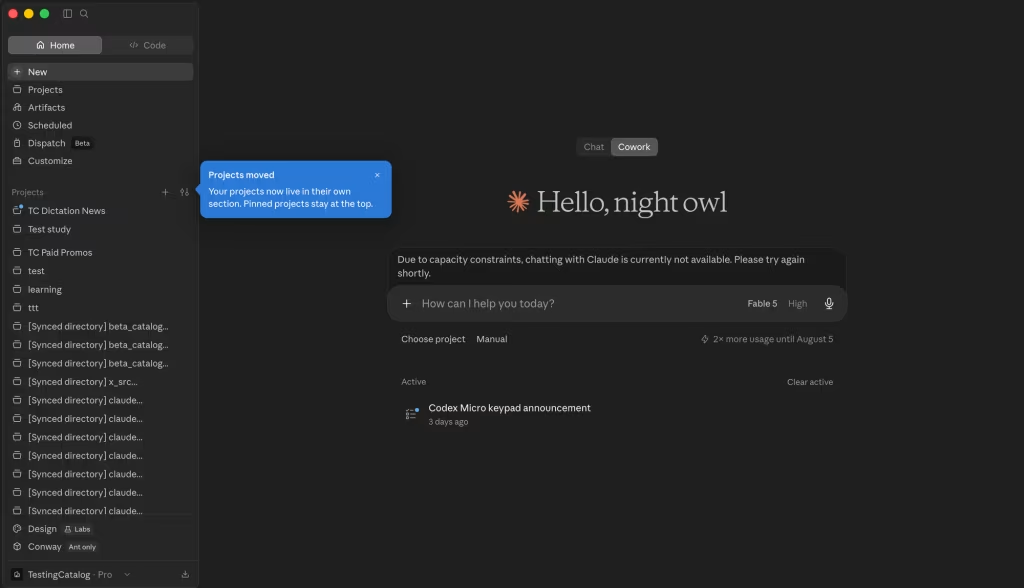
Anthropic is testing a redesigned interface for its Claude desktop application, introducing a new placement for Projects in the sidebar and relocating the Chat/Cowork mode switcher to the top of the window. The experimental layout is aimed at making project management more accessible and streamlining navigation for users who rely on Claude for long-running workflows and coding tasks.
The interface changes, uncovered in recent test builds, suggest Anthropic is continuing to refine Claude’s desktop experience as competition intensifies with OpenAI’s ChatGPT and Google’s Gemini. While the features appear to be part of a limited A/B test rather than an imminent public rollout, they highlight the company’s broader strategy of making Claude the central hub for AI-assisted productivity.
Anthropic Tests New Sidebar Layout for Projects
The most notable change under testing is the integration of Projects directly into Claude’s left-hand navigation panel.
Instead of requiring users to access a separate Projects page, the new interface would allow them to:
- Open projects directly from the sidebar.
- Pin frequently used projects.
- Sort projects based on user preferences.
- Customize which projects appear in the navigation panel.
The redesign is intended to reduce friction for users managing multiple AI workspaces, enabling faster switching between ongoing tasks and conversations.
Proposed Sidebar Improvements
| Feature | Purpose |
|---|---|
| Projects in sidebar | Faster access to ongoing work |
| Pin projects | Quick access to frequently used projects |
| Sorting options | Better organization |
| Custom visibility | Personalized navigation |
Chat/Cowork Switcher Moves to the Top
Anthropic is also experimenting with relocating the Chat/Cowork mode selector.
The switcher, previously positioned near the prompt bar following an earlier interface update, is now being tested at the top of the application window.
The placement closely resembles the desktop layout adopted by OpenAI’s ChatGPT, which moved its mode selector to the upper-left corner after integrating Codex into the main ChatGPT desktop app earlier this month.
Interface Evolution
| Previous Layout | New Test Layout |
|---|---|
| Mode switcher near prompt bar | Mode switcher at top of window |
| Projects on separate page | Projects integrated into sidebar |
| Conversation-focused navigation | Workspace-focused navigation |
Focus on Long-Term Productivity
The latest interface experiments reflect Anthropic’s broader effort to make Claude more suitable for complex, multi-session workflows.
Direct access to Projects could particularly benefit users who:
- Work across multiple coding repositories.
- Manage research projects.
- Maintain long-running AI conversations.
- Organize professional or collaborative workspaces.
Surfacing Projects alongside recent conversations would reduce navigation steps and make Claude function more like a persistent productivity platform rather than a standalone chatbot.
Benefits for Power Users
| User Type | Potential Advantage |
|---|---|
| Developers | Faster access to coding projects |
| Researchers | Easier management of ongoing work |
| Business users | Improved workspace organization |
| Teams | Better project visibility |
Claude Code May Get Dedicated Project Management
The testing also hints at additional enhancements for Claude Code.
According to the report, Anthropic is developing a dedicated Projects section where users may eventually be able to:
- Create new coding projects.
- Customize project settings.
- Manage multiple repositories.
- View ongoing development work from a centralized dashboard.
Currently, Claude Code primarily operates within a single folder or repository. A project management layer could make it easier for developers to organize multiple coding tasks across desktop and web environments.
Possible Claude Code Enhancements
| Planned Capability | Potential Benefit |
|---|---|
| Dedicated project dashboard | Centralized project management |
| Multiple project support | Better organization |
| Custom project settings | More flexible workflows |
| Unified desktop and web experience | Improved continuity |
Part of Anthropic’s Broader Desktop Strategy
The redesign follows several recent updates to Claude, including the merging of Chat and Cowork into a shared Home interface.
Anthropic has increasingly emphasized the desktop application as the primary environment for deep work, while expanding Cowork features to web and mobile platforms in beta. However, as with many interface experiments, there is no guarantee that the tested changes will reach all users, as Anthropic frequently evaluates multiple designs before deciding on a wider rollout.
Looking Ahead
Anthropic’s latest interface experiments suggest the company is evolving Claude from a conversational AI assistant into a comprehensive productivity workspace. By bringing Projects directly into the sidebar and simplifying navigation, the redesigned desktop experience aims to reduce friction for users managing complex, long-running tasks. While the features remain in testing, they align with a broader industry trend toward AI platforms that combine chat, coding, collaboration, and project management within a single interface.
If these changes are rolled out publicly, Claude users could benefit from a more organized workspace that makes switching between conversations, projects, and development tasks significantly faster. As Anthropic continues refining its desktop experience, usability and workflow efficiency are likely to become increasingly important differentiators in the competitive AI assistant market.
Get the day’s top stories in your inbox
One concise email. No spam, unsubscribe anytime.